¶ Backup Strategy
¶ Overview
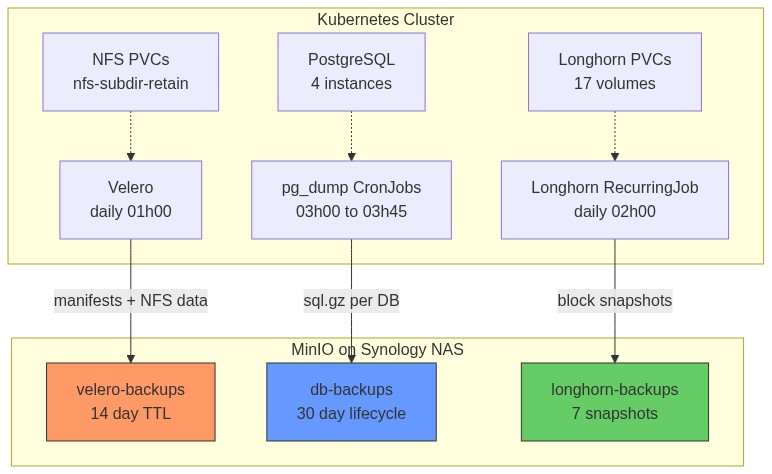
Three complementary backup layers protect the cluster. Each covers different failure scenarios and operates independently so a failure in one layer doesn't affect the others.
| Layer | Tool | What it backs up | Destination | Schedule | Retention |
|---|---|---|---|---|---|
| K8s manifests + NFS PVC data | Velero (Kopia fs-backup) | All namespaces, all NFS PVCs | MinIO velero-backups |
Daily 01:00 | 30 days |
| Longhorn block volumes | Longhorn RecurringJob | All 17 Longhorn PVCs | MinIO longhorn-backups |
Daily 02:00 | 30 snapshots |
| Proxmox VM images | Proxmox vzdump | All 4 VMs | TrueNAS staging (keep-last=1) | Weekly Sat 02:00 | 1 per VM on TrueNAS, 14 days on Synology |
Why three layers?
- Velero restores entire namespaces (manifests + NFS data) — good for catastrophic cluster loss
- pg_dump gives point-in-time, app-consistent, human-readable SQL — good for data corruption or accidental deletes
- Longhorn snapshots are fast incremental block-level backups — good for Longhorn-specific volume recovery
Coverage gap: Longhorn PVCs are NOT backed up by Velero (intentionally excluded — Longhorn handles its own). pg_dump covers only PostgreSQL, not other databases (e.g., Redis). If Redis data matters, add a separate backup.
¶ What Each Layer Covers
¶ Data Flow Architecture
¶ MinIO Backend
All backup data lands in MinIO running on the Synology NAS (192.168.88.19:9000). MinIO provides an S3-compatible API — all tools (Velero, Longhorn, minio/mc) speak standard AWS S3 protocol.
¶ Buckets and Users
| Bucket | MinIO User | Policy | Consumer |
|---|---|---|---|
longhorn-backups |
longhorn |
longhorn-policy |
Longhorn daily volume backups |
velero-backups |
velero |
velero-policy |
Velero K8s + NFS PVC backups |
tempo-traces |
tempo |
tempo-policy |
Tempo distributed trace storage |
harbor-registry |
harbor-registry |
harbor-registry-policy |
Harbor container image blobs |
db-backups |
db-backup |
db-backup-policy |
pg_dump CronJobs (all 4 namespaces) |
router-backups |
mikrotik |
mikrotik-policy |
MikroTik router RSC config exports |
Each user has a least-privilege IAM-style policy scoped to their bucket only (s3:* on that bucket, nothing else). This limits blast radius — a compromised backup credential can only access its own bucket.
¶ Accessing MinIO CLI
MinIO CLI (mc) is only available inside the MinIO container on the NAS. There is no local mc installed.
# List bucket contents
ssh 192.168.88.19 'PATH=/usr/local/bin:/usr/bin:/bin docker exec minio mc ls local/<bucket>/'

# Check bucket sizes
ssh 192.168.88.19 'PATH=/usr/local/bin:/usr/bin:/bin docker exec minio mc du local/'

# Download a file
ssh 192.168.88.19 'PATH=/usr/local/bin:/usr/bin:/bin docker exec minio mc cp local/db-backups/authentik/2026-02-25.sql.gz /tmp/'
scp 192.168.88.19:/tmp/2026-02-25.sql.gz .
¶ Velero (K8s Backup)
¶ How Velero Works
Velero backs up Kubernetes in two distinct phases:
Phase 1 — Manifest backup (Velero server)
The Velero server queries the K8s API and serializes all objects (Deployments, Services, ConfigMaps, PVCs, Secrets, etc.) as JSON, then uploads them to MinIO under velero-backups/backups/<name>/.
Phase 2 — Volume data backup (NodeAgent + Kopia)
For each PVC in scope, the NodeAgent DaemonSet pod running on the same node as the PVC's consumer:
- Mounts the PVC data directory on the host
- Runs Kopia to create a content-addressed, deduplicated, compressed snapshot
- Streams the snapshot chunks to MinIO
Kopia is efficient — subsequent backups only upload changed chunks (incremental by content hash, not timestamp).
Why NodeAgent must run on every worker node: Kopia needs local disk access to the PVC data. If the NodeAgent isn't on the node where the PVC is mounted, that PVC cannot be backed up. The DaemonSet ensures coverage on all 3 workers.
¶ Deployment
| Setting | Value |
|---|---|
| Chart | vmware-tanzu/velero v12.0.0 |
| Namespace | velero |
| Sync Wave | 6 (after Vault=4, VSO=5) |
| Plugin | velero-plugin-for-aws:v1.10.0 (initContainer) |
| Node Agent | DaemonSet on all 3 worker nodes |
¶ Backend Config
| Setting | Value |
|---|---|
| Endpoint | http://192.168.88.19:9000 |
| Bucket | velero-backups |
| Region | us-east-1 (dummy value required by S3 API) |
| Credentials | Vault kv/velero/minio → VSO → K8s secret velero-minio-creds |
The AWS plugin translates Velero's S3 calls into MinIO-compatible requests. The region field is required by the AWS SDK but MinIO ignores it — us-east-1 is a safe dummy.
Credentials are stored in AWS credentials file format:
[default]
aws_access_key_id=velero
aws_secret_access_key=<secret>
¶ Backup Schedules
Two Schedule resources currently active:
| Name | Cron | Scope | TTL |
|---|---|---|---|
daily-full |
0 1 * * * (01:00 daily) |
All namespaces (excludes kube-system, longhorn-system, kube-node-lease, kube-public) |
30 days |
vikunja-12h |
0 13 * * * (13:00 daily) |
vikunja only — mid-day RPO improvement |
30 days |
Both use defaultVolumesToFsBackup: true so Kopia backs up all eligible PVCs. Longhorn PVCs are skipped via VolumePolicy ConfigMap (see below).
Net effect: the vikunja namespace gets RPO ≈ 12 hours instead of 24h. Other namespaces remain on 24h.
¶ Longhorn Exclusion
Longhorn volumes are excluded from Velero fs-backup deliberately — Longhorn handles its own S3 backups. Backing them up twice would waste MinIO space and time.
The exclusion uses two mechanisms for belt-and-suspenders:
-
Label on every Longhorn PVC:
velero.io/exclude-from-backup=true
Velero respects this label and skips the PVC entirely. -
VolumePolicy ConfigMap
velero-fs-backup-volume-policy:version: v1 volumePolicies: - conditions: storageClass: [longhorn, longhorn-2rep] action: type: skipReferenced in the Schedule via
spec.template.resourcePolicies. This catches any Longhorn PVCs that might be missing the label.
¶ Known Gotchas
upgradeCRDs: false required
The chart's pre-install hook runs a velero-upgrade-crds Job using bitnami/kubectl as an init container. Bitnami removed versioned image tags from Docker Hub in late 2024 — only latest exists, but K8s tries to pull a versioned tag matching the server version which returns a 404. The Job fails, blocking the entire install.
Fix: set upgradeCRDs: false. ArgoCD installs CRDs natively from the chart's crds/ directory via ServerSideApply — no pre-install hook needed.
Schedule spec.template.resourcePolicies needs ServerSideApply=false
The resourcePolicies field exists in Velero's Go struct and is perfectly valid at runtime, but it is NOT declared in the CRD's OpenAPI schema. ArgoCD's ServerSideApply (SSA) validates against the schema before submitting — it rejects the field with "field not declared in schema".
Fix: annotate the Schedule resource to opt out of SSA:
metadata:
  annotations:
    argocd.argoproj.io/sync-options: ServerSideApply=false
ArgoCD falls back to client-side apply for this resource only, which skips schema validation.
snapshotsEnabled: false required
Without this, the chart creates a default VolumeSnapshotLocation CR with null provider and credential fields. The Velero webhook validates this CR and rejects it, causing the controller to fail to start.
Since this cluster uses Kopia fs-backup (not CSI volume snapshots), snapshots are not needed:
snapshotsEnabled: false
CRD name conflict with Longhorn
Both Velero and Longhorn define a CRD named backups. kubectl get backups is ambiguous. Always use the fully-qualified resource name:
kubectl get backups.velero.io -n velero          # Velero backups
kubectl get backups.longhorn.io -n longhorn-system  # Longhorn backups
¶ Restore — Full Namespace
# 1. List available backups
kubectl get backups.velero.io -n velero

# 2. Restore a full namespace (e.g., after cluster disaster)
velero restore create --from-backup daily-full-<timestamp> \
  --include-namespaces authentik \
  --wait

# 3. Check restore status
kubectl get restores.velero.io -n velero
kubectl describe restore.velero.io <restore-name> -n velero

# 4. Check for warnings/errors (some are harmless, e.g. already-existing resources)
velero restore logs <restore-name>
Note: PVC data restore via Kopia can take several minutes per GB. Monitor the NodeAgent pod logs during restore.
¶ Useful Commands
# Check backup storage location health (should show Available)
kubectl get backupstoragelocation -n velero

# Trigger a quick manifests-only test backup (no volume data, fast)
kubectl create -f - <<EOF
apiVersion: velero.io/v1
kind: Backup
metadata:
  name: test-manifests-only
  namespace: velero
spec:
  storageLocation: default
  defaultVolumesToFsBackup: false
  ttl: 1h
  excludedNamespaces: [kube-system, longhorn-system, kube-node-lease, kube-public]
EOF

# Watch backup progress
kubectl get backups.velero.io -n velero -w

# View backup details (shows what was included, size, errors)
kubectl describe backup.velero.io <name> -n velero

# Check what's in MinIO
ssh 192.168.88.19 'PATH=/usr/local/bin:/usr/bin:/bin docker exec minio mc ls local/velero-backups/backups/'
¶ pg_dump CronJobs (PostgreSQL Logical Backups)
¶ Why pg_dump in Addition to Velero?
Velero + Kopia backs up the raw PostgreSQL data files. While this works for full restores, it has limitations:
- Restoring a single table or a few rows requires restoring the entire PVC
- Raw data files are not human-readable
- A Velero restore overwrites the entire database, not just the corrupted rows
pg_dump produces standard SQL text files. You can open them, grep for specific rows, and restore selectively with psql. This makes it ideal for data corruption recovery, accidental deletes, and cross-version migration.
¶ How It Works
Each CronJob runs two containers sharing an emptyDir volume:
┌─────────────────────────────────────────────────────────────┐
│ CronJob Pod                                                  │
│                                                              │
│  initContainer: pg-dump                                      │
│  ┌──────────────────────────────────────┐                    │
│  │ pg_dump -h <host> -U <user> <db>     │                    │
│  │   | gzip > /backup/YYYY-MM-DD.sql.gz │                    │
│  │                                      │                    │
│  │  writes to emptyDir /backup/         │                    │
│  └──────────────────────────────────────┘                    │
│              │ waits for init to complete                    │
│  container: mc-upload                                        │
│  ┌──────────────────────────────────────┐                    │
│  │ mc cp /backup/YYYY-MM-DD.sql.gz      │                    │
│  │   minio/db-backups/<ns>/             │                    │
│  └──────────────────────────────────────┘                    │
└─────────────────────────────────────────────────────────────┘
The init container runs first and must complete successfully before the main container starts. If pg_dump fails (e.g., DB unreachable), the pod fails and no partial file is uploaded.
¶ Schedule
| Namespace | PostgreSQL Version | pg_dump Image | Cron | Output Path |
|---|---|---|---|---|
authentik |
PG 17 | postgres:17-alpine |
0 3 * * * |
db-backups/authentik/YYYY-MM-DD.sql.gz |
harbor |
PG 15 | postgres:16-alpine |
15 3 * * * |
db-backups/harbor/YYYY-MM-DD.sql.gz |
nextcloud |
PG 17 | postgres:17-alpine |
30 3 * * * |
db-backups/nextcloud/YYYY-MM-DD.sql.gz |
life-ops |
PG 16 | postgres:16-alpine |
45 3 * * * |
db-backups/life-ops/YYYY-MM-DD.sql.gz |
Why staggered schedules? Each pg_dump can generate significant MinIO write I/O. Staggering by 15 minutes prevents four simultaneous uploads saturating the NAS network link.
Why match pg_dump image to server version? The pg_dump binary must be the same major version as the server (or newer). Using a mismatched version produces a compatibility warning or may fail entirely.
¶ Credentials
Credentials are injected per-namespace via VSO (Vault Secrets Operator):
- Vault path:
kv/<namespace>/db-backup-minio - Keys in Vault:
access_key,secret_key - K8s secret created:
db-backup-minioin each namespace - The
minio/mccontainer reads these as environment variables
¶ Restore Procedure
# 1. Download the backup from MinIO
ssh 192.168.88.19 'PATH=/usr/local/bin:/usr/bin:/bin \
  docker exec minio mc cp local/db-backups/authentik/2026-02-25.sql.gz /tmp/'
scp 192.168.88.19:/tmp/2026-02-25.sql.gz .

# 2. Decompress locally
gunzip 2026-02-25.sql.gz

# 3. (Optional) Inspect — search for specific data before restoring
grep "INSERT INTO users" 2026-02-25.sql | head -20

# 4. Copy the SQL file into the running PostgreSQL pod
kubectl cp 2026-02-25.sql authentik/<postgres-pod-name>:/tmp/restore.sql

# 5. Drop and recreate the database (full restore) — DESTRUCTIVE
kubectl exec -n authentik <postgres-pod-name> -- \
  psql -U postgres -c "DROP DATABASE authentik; CREATE DATABASE authentik;"

# 6. Restore
kubectl exec -n authentik <postgres-pod-name> -- \
  psql -U postgres -d authentik -f /tmp/restore.sql

# 7. Verify row counts
kubectl exec -n authentik <postgres-pod-name> -- \
  psql -U postgres -d authentik -c "\dt" -c "SELECT COUNT(*) FROM users;"
¶ Troubleshooting Failed Backups
# Check recent CronJob history
kubectl get cronjobs -n authentik
kubectl get jobs -n authentik

# View logs from a failed job
kubectl logs -n authentik job/<job-name> -c pg-dump
kubectl logs -n authentik job/<job-name> -c mc-upload

# Manually trigger a backup job now
kubectl create job -n authentik --from=cronjob/pg-dump-backup manual-backup-$(date +%s)
¶ Longhorn Volume Backups
¶ How Longhorn Backup Works
Longhorn backup is a multi-step process:
- Snapshot: Longhorn takes a point-in-time snapshot of the volume (copy-on-write, instant)
- Backup: Longhorn reads the snapshot block-by-block, computes a hash for each 2MB block
- Dedup check: Longhorn queries MinIO to see if that block hash already exists in the bucket
- Upload: Only new/changed blocks are uploaded — making backups incremental by default
- Metadata: A JSON manifest is written to MinIO describing the snapshot structure and block references
This means the first backup uploads everything, but subsequent daily backups only upload changed blocks. A small VM with few writes might upload only a few MB even for a 15Gi volume.
¶ Configuration
| Setting | Value |
|---|---|
| Backup target | s3://longhorn-backups@us-east-1/ (MinIO at 192.168.88.19:9000) |
| MinIO user | longhorn with longhorn-policy |
| K8s secret | longhorn-minio-secret in longhorn-system |
| Secret keys | AWS_ACCESS_KEY_ID, AWS_SECRET_ACCESS_KEY, AWS_ENDPOINTS, AWS_CERT |
| RecurringJob | daily-backup — cron 0 2 * * *, retain 30 snapshots, concurrency 2 |
| Volumes covered | All 17 Longhorn volumes, labelled recurring-job-group.longhorn.io/default: enabled |
¶ Important: BackupTarget CR (Longhorn 1.7+)
Longhorn 1.7 introduced a BackupTarget CRD to replace the settings-based backup target config. The defaultSettings.backupTarget value in values.yaml only applies during the initial install — it does not update an existing BackupTarget CR.
To change or verify the backup target after install:
# View current BackupTarget
kubectl get backuptarget default -n longhorn-system -o yaml

# Update via patch (not via helm values)
kubectl patch backuptarget default -n longhorn-system --type=merge \
  -p '{"spec":{"backupTargetURL":"s3://longhorn-backups@us-east-1/","credentialSecret":"longhorn-minio-secret"}}'
¶ Checking Backup Status
# List all volume backups (shows size, state, created time)
kubectl get backupvolumes -n longhorn-system

# List backup snapshots for a specific volume
kubectl get backups.longhorn.io -n longhorn-system \
  -l longhornvolume=<volume-name>

# Check MinIO directly
ssh 192.168.88.19 'PATH=/usr/local/bin:/usr/bin:/bin \
  docker exec minio mc ls local/longhorn-backups/backupstore/volumes/'
¶ Vault Root Token (Emergency Procedure)
¶ Why This Is Needed
Vault's root token is not stored anywhere permanently — it is generated once during init and then intentionally discarded. This is a Vault security best practice: no one should have a persistent root token.
When you need to perform privileged Vault operations (e.g., seeding new credentials that VSO needs), you generate a temporary root token from the unseal keys, use it, then immediately revoke it. The unseal keys themselves are stored safely in a K8s secret.
¶ Where the Unseal Keys Are
kubectl get secret vault-unseal-keys -n vault -o yaml
# Keys: UNSEAL_KEY_0, UNSEAL_KEY_1, UNSEAL_KEY_2
# (base64 encoded — decode with: kubectl ... | base64 -d)
¶ Generate-Root Procedure
Vault requires a threshold of unseal keys (this cluster: 3 of 3) to generate a root token. The process uses a one-time-pad (OTP) to encrypt the token in transit, so the token is never transmitted in plaintext.
# Step 1: Initialize the generate-root operation
# Returns: nonce (identifies this session) + otp (decryption key)
kubectl exec -n vault vault-0 -- \
  env VAULT_SKIP_VERIFY=true \
  vault operator generate-root -init -format=json
# Save the "nonce" and "otp" values from this output

# Step 2: Provide each unseal key (run 3 times, one per key)
# Each call returns an updated "encoded_token" — only the final one is complete
kubectl exec -n vault vault-0 -- \
  env VAULT_SKIP_VERIFY=true \
  vault operator generate-root -nonce=<nonce> -format=json <UNSEAL_KEY_0>

kubectl exec -n vault vault-0 -- \
  env VAULT_SKIP_VERIFY=true \
  vault operator generate-root -nonce=<nonce> -format=json <UNSEAL_KEY_1>

kubectl exec -n vault vault-0 -- \
  env VAULT_SKIP_VERIFY=true \
  vault operator generate-root -nonce=<nonce> -format=json <UNSEAL_KEY_2>
# The last response will have "complete": true and an "encoded_token"

# Step 3: Decrypt the encoded_token using the OTP from Step 1
kubectl exec -n vault vault-0 -- \
  env VAULT_SKIP_VERIFY=true \
  vault operator generate-root -decode=<encoded_token> -otp=<otp>
# This prints the plaintext root token

# Step 4: USE the token for your task

# Step 5: IMMEDIATELY revoke it when done
kubectl exec -n vault vault-0 -- \
  env VAULT_SKIP_VERIFY=true VAULT_TOKEN=<token> \
  vault token revoke <token>
Security note: Never leave the terminal with a root token in your shell history or environment. After use, clear the terminal:
history -c && unset VAULT_TOKEN.
¶ Backup Monitoring & Alerts
vmalert fires alerts when backup jobs go stale or fail. Rules live in core-components/vmalert/values.yaml under the backup-staleness rule group.
¶ Alert: BackupJobStale
Fires when a CronJob has not completed successfully in >25 hours (catches missed daily runs including skipped runs).
expr: (time() - kube_cronjob_status_last_successful_time{
        namespace=~"authentik|harbor|nextcloud|life-ops",
        cronjob="db-backup"
      }) / 3600 > 25
for: 10m
severity: warning
A second rule covers Longhorn (namespace="longhorn-system", cronjob="daily-backup").
¶ Alert: BackupJobFailed
Fires immediately when a backup job pod exits non-zero. The job_name selector is intentionally narrow — without it, unrelated CronJobs in the same namespaces (e.g. reminder-checker in life-ops) would trigger false critical alerts.
expr: kube_job_status_failed{
        namespace=~"authentik|harbor|nextcloud|life-ops|longhorn-system",
        job_name=~"db-backup.*|daily-backup.*|restore-test.*"
      } > 0
for: 5m
severity: critical
Both alerts route to ntfy topic homelab-alerts via Alertmanager webhook bridge.
¶ Checking Alert State
# View firing alerts in vmalert
kubectl -n monitoring port-forward svc/vmalert 8880:8880
# Open http://localhost:8880/alerts

# Check CronJob last success times
kubectl get cronjobs -A | grep -E "db-backup|daily-backup"
kubectl get cronjob db-backup -n authentik -o jsonpath='{.status.lastSuccessfulTime}'
¶ Monthly Restore Test (Authentik)
A CronJob in the monitoring namespace runs on the 1st of each month at 06:00 and verifies the authentik backup is actually restorable.
What it does:
- init container (
minio/mc): downloads today'sdb-backups/authentik/YYYY-MM-DD.sql.gzfrom MinIO - main container (
postgres:17-alpine): spins up a throw-away PostgreSQL, restores the dump, counts tables - Pass condition: >5 tables restored → ntfy notification to homelab-alerts
✅ Monthly restore test PASSED - Fail condition: ≤5 tables → ntfy notification to homelab-alerts
❌ Monthly restore test FAILED
Resources:
- CronJob:
restore-testinmonitoringnamespace,0 6 1 * * - MinIO credentials: Vault
kv/monitoring/db-backup-minio→ VSO → K8s secretrestore-test-minio - ntfy token: from existing
alertmanager-ntfysecret inmonitoring
# Manually trigger a restore test
kubectl create job -n monitoring --from=cronjob/restore-test manual-restore-test-$(date +%s)
kubectl logs -n monitoring job/<job-name> -c verify -f
¶ MikroTik Router Backup → MinIO
The MikroTik router (RouterOS 7.21.3) exports its complete configuration daily and uploads it to MinIO.
¶ How It Works
| Step | Action |
|---|---|
| 1 | RouterOS scheduler Daily-Backup-Job triggers Backup-Run script at 03:00 daily |
| 2 | Script runs /export show-sensitive file=<filename> — exports full config including passwords as .rsc |
| 3 | RSC file uploaded to MinIO via FTP (192.168.88.19:2121) to router-backups/<hostname>-config_<date>.rsc |
| 4 | Local flash copy deleted |
| 5 | ntfy notification sent to homelab-ops topic (✅ OK or 🚨 FAILED) |
| 6 | Healthchecks.io ping sent |
A second script Backup-Cleanup runs separately and deletes .rsc files older than 30 days from the USB stick (local retention policy).
¶ MinIO Config
| Setting | Value |
|---|---|
| Bucket | router-backups |
| MinIO User | mikrotik |
| FTP Port | 2121 (passive range 30000-30010) |
| Network | --network=host required — Docker NAT breaks passive FTP when source is gateway 192.168.88.1 |
¶ RouterOS Script Policy
Both Backup-Run script and the Daily-Backup-Job scheduler require policy: ftp,read,write,test,password,sensitive
¶ RouterOS Scripting Gotchas
/system backup saveis blocked from scheduler scripts in RouterOS 7 (security restriction) — use/exportinsteadshow-sensitiveis a standalone keyword (no=):/export show-sensitive file=...- Hyphens in parameter names (e.g.
hide-sensitive=no) are parsed as subtraction — always use keyword form Flags: I - invalidon schedulers in CLI is a stale display bug — verify via REST API (invalid=falseis authoritative)
¶ Proxmox VM Backup → Syncthing → Synology
See Proxmox Backup for the full VM backup workflow documentation.